MLOps Pipeline

SentimentFlow

Production MLOps pipeline for real-time sentiment analysis. RoBERTa model serving, Prometheus monitoring, Airflow orchestration, and MLflow experiment tracking.

94% TweetEval Accuracy
< 200ms p99 Inference Latency
5 Monitoring Services
2 Airflow DAGs

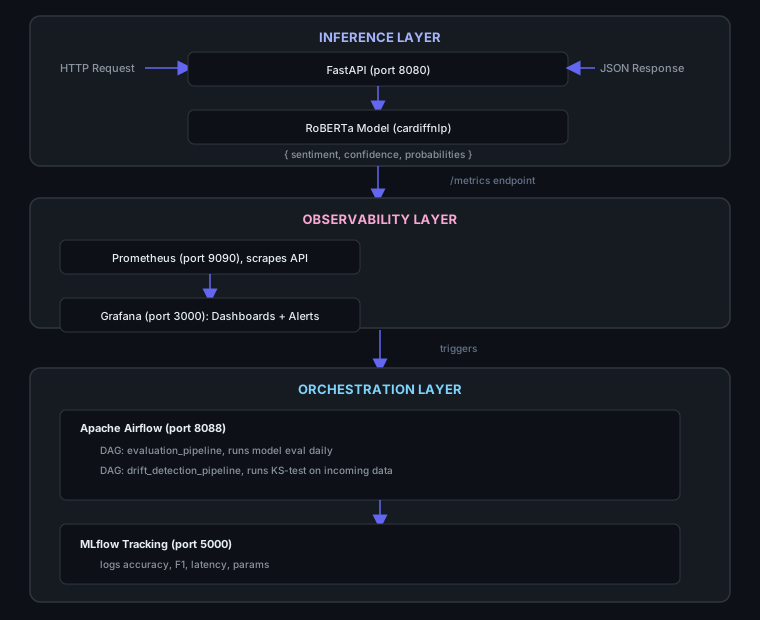
System Architecture

SentimentFlow Architecture
FastAPI RoBERTa (cardiffnlp) Prometheus Grafana MLflow Apache Airflow Docker Compose GitHub Actions PEFT / LoRA Python 3.10

Live API Demo

Result: Confidence:
Positive
Neutral
Negative
Model: cardiffnlp/twitter-roberta-base-sentiment-latest  |  Latency: ms

Pre-computed examples (from local model run):

POSITIVE 97%

"This is an absolutely fantastic product! I couldn't be happier."

NEUTRAL 82%

"The service was okay, nothing special really."

NEGATIVE 95%

"Terrible experience. The product broke after two days."

How It Works

📥
1. Ingest
Text arrives via REST API (single or batch). Input validation ensures text length and format are correct.
🤖
2. Predict
SentimentFlow's RoBERTa model tokenizes the text and produces logits. Softmax converts to probabilities across positive, neutral, negative classes.
📊
3. Monitor
Prometheus scrapes /metrics every 15s. Grafana dashboards track prediction counts, confidence distributions, and latency percentiles.
🔄
4. Retrain
Airflow DAGs run daily evaluation and drift detection. KS-test flags distribution shifts, triggering LoRA fine-tuning and MLflow logging.

Pipeline Status

API (FastAPI)
Running: port 8080
Prometheus
Running: port 9090
Grafana
Running: port 3000
Airflow
Running: port 8081
MLflow
Running: port 5000

Quick Start

BASH: 3 commands to run the full stack
# 1. Clone and enter the repo $ git clone https://github.com/Hamilas/SentimentFlow.git && cd SentimentFlow # 2. Copy environment config $ cp .env.example .env # 3. Start all 5 services $ docker compose up -d # Services come up at: # API: http://localhost:8080 # API Docs: http://localhost:8080/docs # Prometheus: http://localhost:9090 # Grafana: http://localhost:3000 # Airflow: http://localhost:8081 # MLflow: http://localhost:5000